Adding Hashtags to DailyWords
DailyWords is a journaling app where I wanted organization to feel effortless. I didn’t want people thinking about taxonomy while they’re trying to write. So I built a tagging system that basically does the thinking for you.
The problem
Journaling apps tend to go one of two ways with organization. Either they give you nothing and your entries just pile up chronologically, or they give you folders and categories and labels that you have to manage yourself. The first means you can never find anything. The second means you’re spending mental energy on filing instead of writing.
I wanted something in between. You write naturally, and the app figures out how to organize it.
How it works
You just type hashtags in the editor as you write. #gratitude, #work, #morning-pages, whatever feels right in the moment. When you save, the app extracts them, normalizes them, and stores them on the entry. That part is simple.
AI suggestions that learn your patterns
Once you’ve written enough in a session, the app suggests tags.
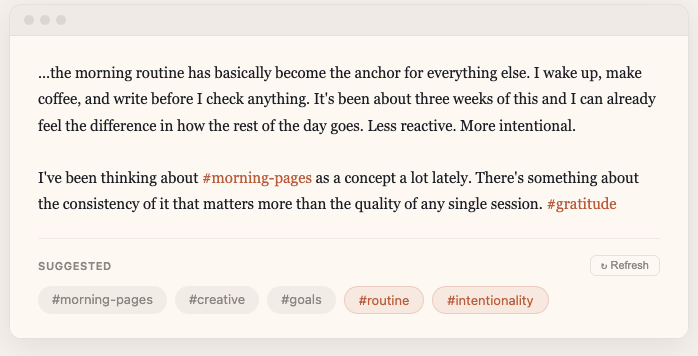
The suggestions trigger automatically at 500 and 1000 words per session. There’s also a manual refresh button with a 30-second cooldown. I wanted to catch natural writing breakpoints without interrupting flow.
Behind the scenes, a Cloud Function sends your entry to Gemini along with your full tag history, including usage counts, when you last used each tag, and any descriptions you’ve written for them. Gemini returns two groups: existing tags from your history that fit this entry, and new tags it thinks you should start using based on your patterns.
The system doesn’t just match keywords. It learns what kinds of tags you tend to use and suggests new ones that feel like yours. If you’ve been tagging entries #morning-pages and #creative and #routine, it might suggest #ritual for an entry about your morning coffee process. It fits your existing vocabulary instead of imposing its own.
The UI shows existing tags as gray chips and new suggestions in rust. You tap to insert. Dismissed suggestions slide out and the next one fills in from a queue, so it doesn’t re-fetch on every dismissal.
You don’t have to remember what tags you’ve used before or decide whether to create a new one. The system knows your history and keeps things consistent.
The tag browser
The Reflect section has a tag browser where you can see all your tags at a glance, sorted by frequency, last used, or first created.
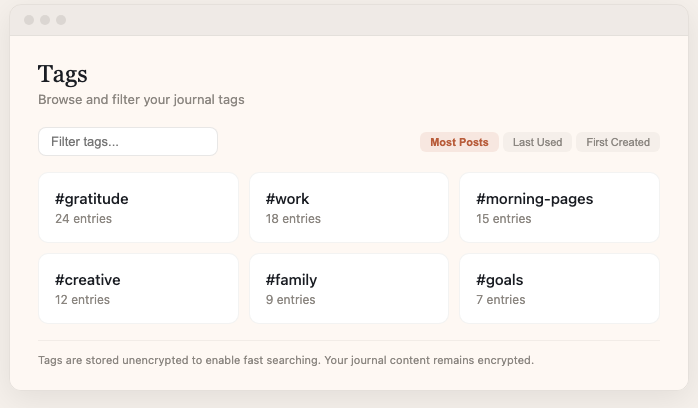
I think of this as the map of your journal. Over time, the tags paint a picture of what you actually write about, which is often different from what you think you write about. Someone might assume their journal is mostly about work, but the tag counts show they write about family twice as often.
There’s a filter input for real-time substring matching if you have a lot of tags. Clicking a tag takes you to a detail view with every entry that uses it.
Tag detail and descriptions
Each tag has a detail page showing all entries and an AI-generated summary of how you’ve used that tag over time.

The summaries come from a Cloud Function that analyzes your entries for a given tag and generates a description. You can also write your own description (max 30 words) that overrides the AI version. If you delete your override, it goes back to the AI summary.
It turns a tag from a label into something with context. Seeing “a recurring thread through most entries, especially around small daily rituals” next to #gratitude tells you something about your own patterns that you might not have noticed.
Entries in the detail view decrypt on demand. You click to expand, and the app decrypts that entry’s content. This keeps the page fast even with dozens of entries.
Why this matters
It removes a decision from the writing process. You don’t have to think about organization while you’re writing. You just write, maybe drop a hashtag or two if something comes to mind, and the system handles the rest.
Over time, your tag collection becomes a genuinely useful lens on your own thinking. A pattern recognizer that runs quietly alongside your writing practice.